HiDownload is back, we re-wrote it, now you can download HiDownload (Phoenix)
Software requirement: HiDownload
6.99 or higher (Download
it)
How to download youtube flv video by HiDownload
HiDownload as Youtube Video Downloader, just copy the flv
video's URL from Youtube,
and copy to HiDownload window. HiDownload will analyse automatically
data and get the actual URL, then download flv video file
to your PC.
Step by Step Instructions
1.Download and install HiDownload
Platinum.
2.Open the Youtube
website
3.click mouse right-button on the flv video.
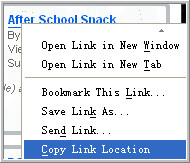
4.select the "Copy Shortcut"(IE Browser) menu
or "Copy Link Location"(FireFox Browser)
5.Run HiDownload Platinum.
6.Click the "Add" button ,
you can find the flv url in the "URL" editbox,
and the streams is "Flash Video Streaming".
,
you can find the flv url in the "URL" editbox,
and the streams is "Flash Video Streaming".

7.click "OK" button, HiDownload will start to
download the flv video file.
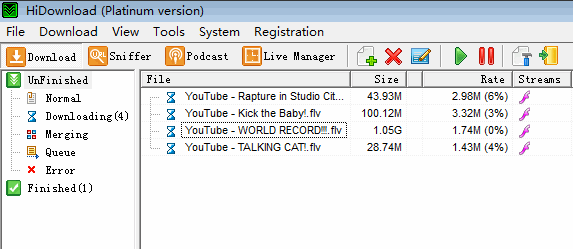
Free
Download HiDownload Platinum
NOTE: If you want to convert
youtube video to your iPhone/iPod/iTouch/iPad,
you can use "Streamingstar
Converter" to convert the videos.

How to download automatically high quality video from youtube.com
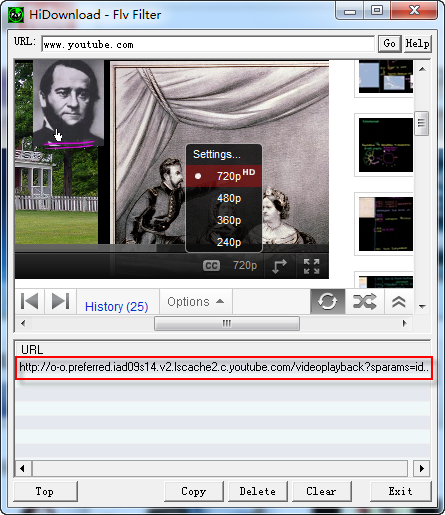
Now, youtube.com offer more video formats(720p HD, 480p,
360p, 240p, ...). If you want to download other formats,
you can play the video in "Flv
Filter" of HiDownload Platinum, and select the
video format, wait a moment, you will find the video downloadable
address link in the list. Copy the link, and download
it by HiDownload Platinum.
Free
Download HiDownload Platinum


 HiDownload
as FLV Downloader, download flv, mp4 video from youtube
HiDownload
as FLV Downloader, download flv, mp4 video from youtube


