| HiDownload
add "Flv Filter" feature in HiDownload
7.0 or Higher version(Download it)
, help you get the http URL(.flv, .mp4, .mp3, .f4v, .mov,
asx, wmv, asf, smil, smi, ram, rm, ...) of music, movies,
and most videos.
1.Run HiDownload, select "Tools -> Flv
Filter" menu.
2. open "Flv Filter" window, input
the play address of flv video, then press <Go> button
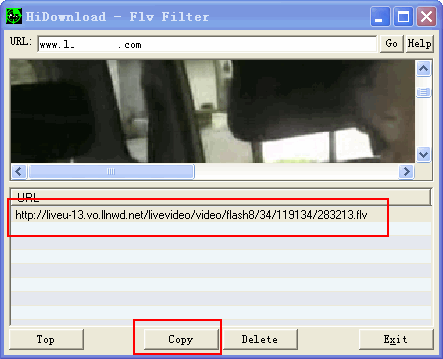
3.wait a moment, then you can find the URL in
the list.
4.Select the item, click <copy> button
and open HiDownload "Add" window to download it.
Note:
- Now, HiDownload Platinum have added the sniffer feature
which help you find all stream's links, more details: >>
- If you want to find more URLs(RTMP,
MMS, RTSP), then URL
Helper also can help you get them.
- Convert
downloaded video and audio to iPhone,
iPod, Zune, XBox, PS3, PSP, try "Streamingstar
Converter"
- If you can not get the flv video's URL, you can try "Flv
Recorder" to record the flv video from
those sites.


|