|
How to Download/record/Rip SHOUTcast™
and IceCast MP3 Streams
Software requirement: HiDownload 6.96
or higher (Download
it)
1.Open the "SHOUTcast"
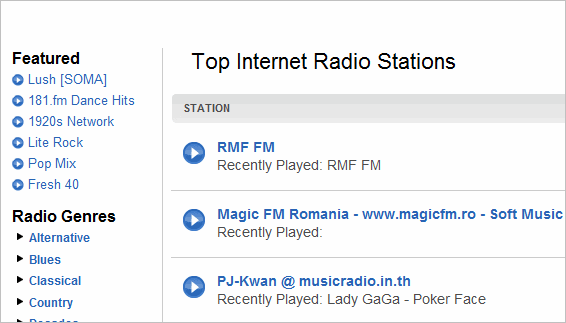
2. click mouse right-button on a play image in shoutcast.com,
then select "Copy Shoutcut" menu, copy the URL:
http://yp.shoutcast.com/sbin/tunein-station.pls?id=1116397
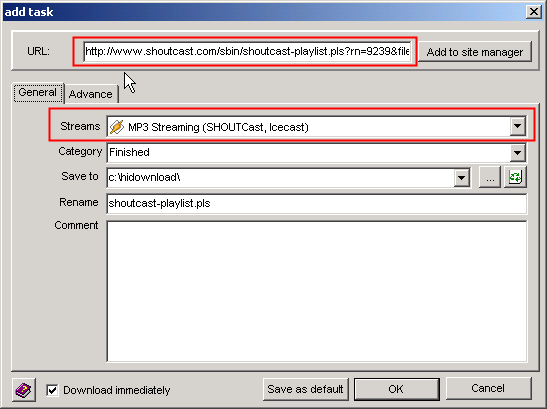
3.Run HiDownload, open "add" windows,
and select the "MP3 Streaming(Shoutcast, IceCast)"
streams.
4.clicked the "OK" button, HiDownload start to
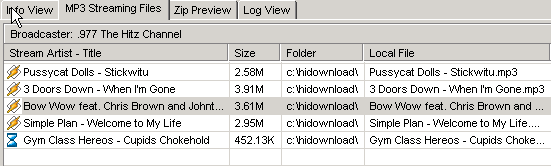
save the MP3 data to your PC.
5.After HiDownload save some songs, You can
double-clicked the file in the list to play it.
OK. Now you know HiDownload is a excellent SHOUTcast™/IceCast
Ripper. If you have any question or suggestion, please email
us, thanks.


Shoutcast
is a trademark of AOL Time Warner.
HiDownload
is not intended for use in circumventing copy protection
mechanisms or for making illegal copies of copyrighted content.
Please respect the rights of the content owners when recording.
Updated: Aug 10, 2010
|



 Download
Shoutcast MP3 Streaming
Download
Shoutcast MP3 Streaming